Chuyển đến nội dung

DevOps VN

DevOps là phải lười ~_~

Danh mục

  • Cơ sở dữ liệu (11)
    • Elasticsearch (2)
    • Mysql (1)
    • Oracle (2)
    • Posgresql (4)
  • Code (12)
    • BashShell (4)
    • batch (1)
    • Powershell (2)
    • Python (6)
  • Hệ thống (74)
    • Ảo hoá (7)
    • Container (7)
    • Linux (39)
    • Mail server (1)
    • Web server (2)
    • Windows (12)
  • NETWORK (11)
    • F5 ADC (1)
    • Firewall Juniper SRX (1)
  • Trick (32)

Lưu trữ

  • Tháng bảy 2025 (1)
  • Tháng ba 2025 (1)
  • Tháng sáu 2024 (1)
  • Tháng năm 2024 (1)
  • Tháng tư 2024 (1)
  • Tháng Một 2024 (1)
  • Tháng mười hai 2023 (1)
  • Tháng năm 2022 (2)
  • Tháng hai 2022 (1)
  • Tháng bảy 2021 (1)
  • Tháng sáu 2021 (2)
  • Tháng năm 2021 (3)
  • Tháng tư 2021 (1)
  • Tháng Một 2021 (1)
  • Tháng mười hai 2020 (1)
  • Tháng mười 2020 (1)
  • Tháng chín 2020 (1)
  • Tháng sáu 2020 (2)
  • Tháng năm 2020 (2)
  • Tháng tư 2020 (3)
  • Tháng ba 2020 (5)
  • Tháng hai 2020 (1)
  • Tháng Một 2020 (2)
  • Tháng chín 2019 (2)
  • Tháng tám 2019 (13)
  • Tháng bảy 2019 (7)
  • Tháng sáu 2019 (4)
  • Tháng năm 2019 (5)
  • Tháng tư 2019 (1)
  • Tháng hai 2019 (3)
  • Tháng Một 2019 (8)
  • Tháng mười hai 2018 (1)
  • Tháng mười một 2018 (2)
  • Tháng mười 2018 (8)

Thẻ: windows 7

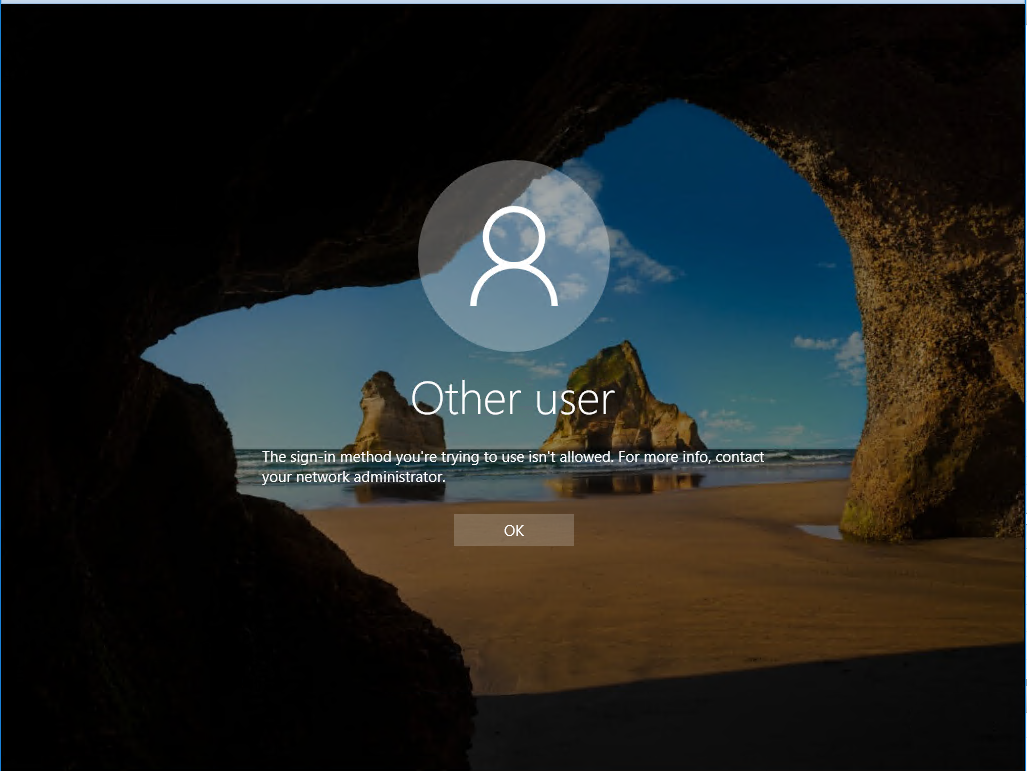
Fix lỗi “The sign-in method you’re trying to use isn’t allowed”

Case: tạo user trên AD windows 2016. sau đó log in trên màn hình console thì báo lỗi. Hướng xử lý như sau:
Quay lại sử dụng user administrator

1) Open the Group Policy editor using gpmc.msc
2) Select your domain and expand Group Policy Objects then right click on "Default Domain Controller Policy"    and Click Edit
3) Under Computer Management, expand Policies and then select Windows Settings
4) Expand Security Settings and Select Local Policies and then click on User Rights Management
5) Right click on Allow Logon Locally and click on Properties
6) In the next screen you can Add the User of Group that you want

Hoặc

1) Open the Group Policy editor using gpmc.msc
2) Select your domain and expand Group Policy Objects then right click on "Default Domain Controller Policy"    and Click Edit
3) Under Computer Management, expand Policies and then select Windows Settings
4) Expand Security Settings and Select Local Policies and then click on User Rights Management
5) Right click on Deny log on locally and click on Properties
6) In the next screen you can remove the User of Group that you want


Đăng vào ngày 09/02/2019Danh mục Hệ thống, Trick, WindowsThẻ bypass windows password, crack windows password, delete windows password, forgot active directory password, forgot administrator password, forgot domain administrator password, forgot laptop password, forgot outlook password, forgot outlook pst password, forgot sql server password, forgot windows 7 password, forgot windows 8 password, forgot windows 8 tablet password, forgot windows administrator password, forgot windows login password, forgot windows password, forgot windows xp password, forgotten windows password, hack windows password, HP windows 8 password reset, lost windows password, password, password reset disk, pdf password recovery, recover firefox password, recover windows 7 product key, recover windows password, remove pdf restrictions, remove windows password, reset domain administrator password, reset sql server password, reset windows 7 password, reset windows 8 password, reset windows 8 tablet password, reset windows administrator password, reset windows login password, reset windows password, reset windows xp password, The sign-in method you’re trying to use isn’t allowed, UEFI BIOS, windows 7, windows 8, windows password recovery, windows password reset disk, windows server 2008
Tự hào được phát triển từ WordPress